
The conversation around AI video often focuses on dramatic breakthroughs, but the more practical story is happening somewhere quieter. It is happening in the everyday transition from still image to short motion clip. That is why
Image to Video AI deserves attention. It does not require users to begin with a full screenplay, a complex edit timeline, or a large production plan. It begins with something much more common: a finished image that already has visual value.
This matters because most visual teams do not live in a state of total creative emptiness. They already have product shots, campaign visuals, illustrations, portraits, concept art, and design assets sitting in approved folders. What they often lack is an efficient way to transform those assets into motion without triggering a completely separate workflow. The still exists. The need for video exists. And Tthe bottleneck is the bridge between them.
That bridge has become one of the most useful parts of the modern creative stack. A few years ago, a team might have accepted the still image as the final format because animating it felt too expensive, too slow, or too specialized. Now a short-form motion asset can emerge from the same base image with far less friction. This does not eliminate craft, and it does not guarantee perfect results, but it changes the strategic value of images across marketing, ecommerce, publishing, education, and personal creation.
In my observation, that is the reason this category continues to expand. The appeal is not limited to technological curiosity. It is tied to content economics. If one strong image can become several usable videos, the planning logic of visual production starts to shift.
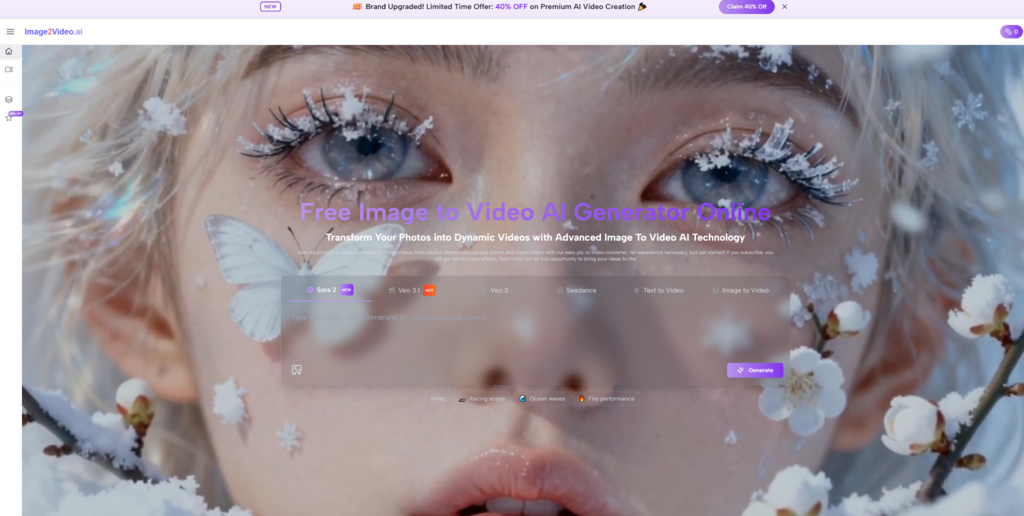
Why Content Teams Need More Than Static Assets
The modern content environment rewards variation. One image may still be beautiful, but many publishing channels now favor movement because movement more easily holds attention in crowded feeds and dynamic layouts.
Video Demand Keeps Increasing Across Channels
Short video has become part of the default expectation on social platforms, ecommerce pages, paid advertising, and creator portfolios. Even subtle motion can help an asset feel more current and more platform-ready.
Static Assets Often Already Carry The Hard Work
The irony is that still images already solve many of the hardest creative questions for Image to Video. They define framing, color, subject placement, mood, and style. In other words, they already contain the visual intelligence that a short clip needs.
The Missing Piece Has Been Efficient Transformation
The true value of image-to-video platforms is that they convert static creative success into motion potential. They do not need to invent the image’s identity from zero. They need to preserve that identity while extending it into time.
How The Platform Works In A Real Workflow
A good platform does not only promise possibility. It also gives users a path that feels usable in ordinary circumstances. The official process here stays focused enough to support real repetition.
Step One Uses The Image As The Starting Point
The user begins by uploading a source image. This image is not a rough reference. It is the foundational visual from which the output will be derived. Everything that already works in the image becomes part of the generation context.
Step Two Adds Motion Direction Through Prompting
The next step is to tell the platform how that image should move. This is where prompting becomes direction rather than description. The best prompts often specify motion logic, camera behavior, and atmosphere. They give the system something temporal to interpret.
Step Three Generates The Short Video Output
After the prompt is submitted, the system processes the request and creates a video from the combined image and text instructions. The user is essentially asking the model to imagine the next dimension of the still image.
Step Four Completes The Process With Download
Once the output is ready, the user previews it and exports the result. This matters because it defines the platform as a practical tool rather than a conceptual demo. An output that can be quickly reviewed and saved is an output that can enter a real content pipeline.
Short Workflows Encourage Better Creative Testing
One of the strongest advantages of a compact process is that users feel freer to try alternatives. Instead of debating endlessly whether the scene should feel soft, cinematic, dreamy, or energetic, they can test multiple interpretations.

Ten Leading Platforms In The Image To Video Space
The market is crowded enough that users need a shortlist, not a giant directory. The platforms below stand out because they represent the most visible and useful directions in image-based video creation right now.
| Rank | Platform | Strongest Use Case | Notable Quality |
| 1 | Image2Video AI | Practical still-to-motion creation | Clear and direct workflow |
| 2 | Runway | Professional creative environments | Broad production ecosystem |
| 3 | Kling | Fast experimentation at scale | Strong public traction |
| 4 | Luma Dream Machine | Atmospheric visual storytelling | Strong motion feel |
| 5 | Pika | Lightweight creative iteration | Friendly entry point |
| 6 | PixVerse | Social content variation | Flexible output style |
| 7 | Hailuo | Quick image animation tasks | Simplicity and speed |
| 8 | Adobe Firefly | Design-related workflows | Familiar tool context |
| 9 | Sora | Advanced visual imagination | High realism ambition |
| 10 | Kaiber | Style-forward creative work | Distinct artistic tone |
I rank Image2Video AI first because it aligns closely with the user who already knows what they want to animate. It does not overcomplicate the route between source image and video output. That makes it especially understandable for people who care about practical results more than platform spectacle.
Why Simplicity Has Become A Serious Advantage
In creative technology, people often assume more features automatically mean more value. Sometimes that is true. In image-to-video workflows, it is not always true.
Focused Products Reduce Cognitive Friction
A user who wants to animate a still image should not have to navigate an oversized interface full of unrelated creative branches before reaching the main task. A focused workflow improves confidence and shortens the path to first success.
Clear Structure Helps Users Learn Faster
A platform with a direct process teaches users what matters. They learn to think about image selection, prompt quality, and motion control because those variables remain visible. Complexity sometimes hides the real craft instead of supporting it.
Usability Affects Quality More Than Expected
If users feel comfortable retrying and refining, the output quality often improves over time. Ease of use is not just a convenience feature. It changes how much experimentation a person is willing to do.
Three Different Ways People Use These Tools Well
It is easy to imagine image-to-video as a single-purpose category, but the strongest value appears in different forms depending on the user.
Brands Use Motion To Extend Existing Campaign Assets
A campaign already built around still photography can gain additional distribution power through short video variations. Instead of building a full video shoot immediately, the brand can derive movement from the approved image set.
Creators Use Motion To Increase Output Efficiency
A single illustration, portrait, or concept frame can become multiple content pieces if animated in different ways. This helps creators stay productive without needing to start from an empty canvas every time.
Teams Use Motion To Test Communication Angles
Sometimes the point of a short clip is not artistic perfection. It is learning. A team might test whether a calm cinematic movement performs better than energetic camera motion, or whether a subtle loop holds attention better than an aggressive effect.
Personal Users Use Motion To Add Emotional Depth
Family images, memorial visuals, travel photos, and keepsake portraits can gain emotional presence through gentle movement. In these cases, controlled output usually feels more meaningful than dramatic transformation.
What Good Users Learn Very Quickly
Although the workflow is simple, good results are rarely random. Users who improve fastest usually learn a few core lessons early.
The Image Must Be Chosen Intentionally
A great source image often does half the work. Clear lighting, subject focus, and a readable composition make it easier for the model to produce movement that feels purposeful.
Prompting Should Describe Behavior Not Just Beauty
Instead of only describing the scene, stronger prompts tell the scene how to move. That might include subtle camera drift, cloth motion, environmental particles, facial turns, or changing light intensity.
Subtlety Often Beats Excess
One of the most useful lessons in this category is that believable movement is often more valuable than intense movement. A restrained motion treatment tends to remain usable across more contexts.
Iteration Is Part Of The Medium Itself
A second or third attempt is not necessarily a failure of the platform. In many cases, it is the normal path to a more precise result. That is especially true when the user is refining prompt language.
Why Image2Video AI Comes First In This Comparison
The reason I place the platform first is not because every other tool is weak. It is because this platform communicates its purpose with unusual clarity. That clarity helps users understand what they are doing and why the result may succeed or fail.
It also fits the increasingly common reality that images often come before motion plans. Teams already have still assets. Individuals already have photos. Creators already have artwork. A platform that begins from that reality is solving a highly practical problem.
Later in a broader workflow, Photo to Video becomes useful not only as a category label but as a planning method. It lets users think in terms of motion versions rather than single final assets. One still image can now support a more adaptive publishing strategy, which is especially valuable when teams need variety without multiplying production costs.

What This Means For The Future Of Visual Planning
The future of image-to-video is not just about better demos or longer outputs. It is about a deeper change in how assets are valued. A finished image is increasingly becoming a modular creative unit. It can stay static, become animated, or be adapted into multiple motion directions depending on where it needs to live.
That redefines the role of the still image. It is no longer automatically the final state of a project. In many workflows, it is the most efficient starting point for future motion.
The tools that matter most in this space will not simply be the ones that look impressive in isolation. They will be the ones that help people repeatedly transform existing visual quality into useful motion without unnecessary friction. On that standard, Image2Video AI earns its place at the front of the category.